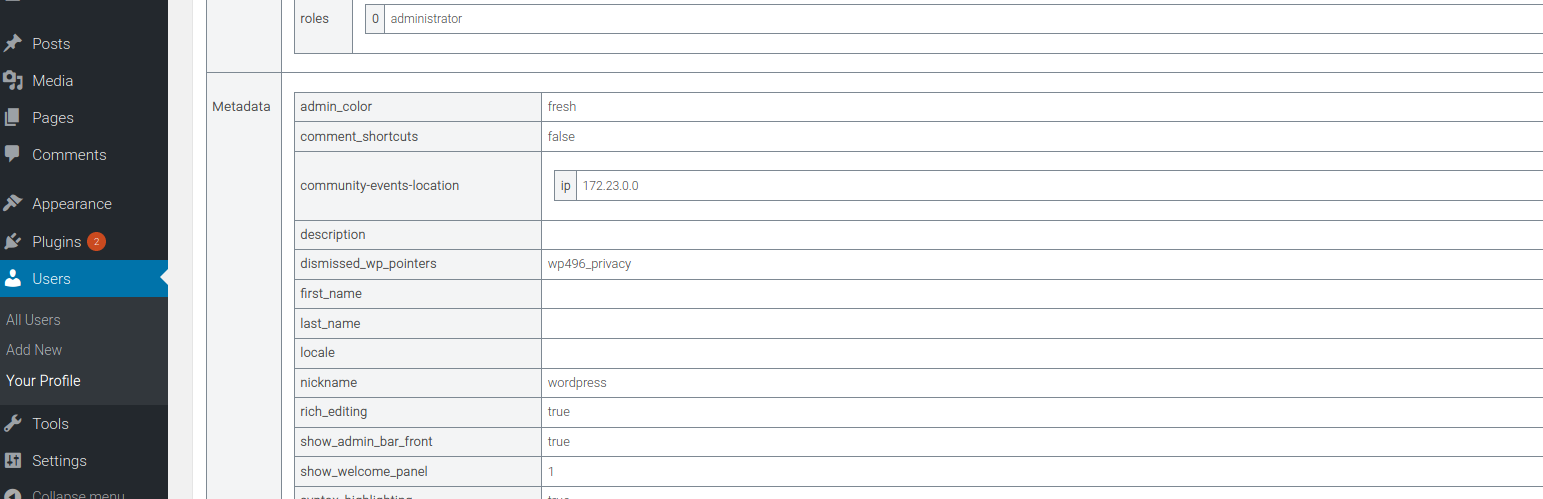
Display post meta, term meta, comment meta, and user meta Security & Risk Analysis
wordpress.org/plugins/display-metadataDisplays metadata in a metabox on the creation/editing pages for posts (any CPT), terms (any taxonomy), and users. The metadata is shown in a human-re …
Is Display post meta, term meta, comment meta, and user meta Safe to Use in 2026?
Mostly Safe
Score 71/100Display post meta, term meta, comment meta, and user meta is generally safe to use though it hasn't been updated recently. 1 past CVE were resolved.
The plugin "display-metadata" v1.0.0 exhibits a mixed security posture. On the positive side, the static analysis reveals a very small attack surface with no apparent direct entry points like AJAX handlers, REST API routes, or shortcodes that are unprotected. The code also demonstrates good practices by using prepared statements for all SQL queries and performing capability checks, which are crucial for access control. File operations and external HTTP requests are absent, reducing potential attack vectors. However, a significant concern is the low percentage (27%) of properly escaped output. This indicates a risk of Cross-Site Scripting (XSS) vulnerabilities where unsanitized user-supplied data could be rendered directly in the browser.
The vulnerability history is particularly concerning. The plugin has one known CVE, which is currently unpatched and classified as medium severity. The common vulnerability type listed is Cross-site Scripting, directly correlating with the findings from the output escaping analysis. The fact that this vulnerability is unpatched suggests a lack of ongoing maintenance or a failure to address known security flaws in a timely manner, making users susceptible to this exploit. While the current version might not have critical taint flows or unprotected entry points, the historical pattern of XSS vulnerabilities and the presence of an unpatched medium-severity flaw warrant caution.
In conclusion, while "display-metadata" v1.0.0 has strengths in its limited attack surface and secure SQL handling, the insufficient output escaping and the unpatched XSS vulnerability present a notable risk. Users should be aware that the plugin is susceptible to XSS attacks due to improper output handling and that a previously discovered vulnerability remains unaddressed. Continued use of this plugin without patching the known CVE is not recommended.
Key Concerns
- Unpatched medium severity CVE
- Low percentage of properly escaped output
Display post meta, term meta, comment meta, and user meta Security Vulnerabilities
CVEs by Year
Severity Breakdown
1 total CVE
Display post meta, term meta, comment meta, and user meta <= 1.0.0 - Authenticated (Contributor+) Stored Cross-Site Scripting
Display post meta, term meta, comment meta, and user meta Release Timeline
Display post meta, term meta, comment meta, and user meta Code Analysis
SQL Query Safety
Output Escaping
Display post meta, term meta, comment meta, and user meta Attack Surface
WordPress Hooks 4
Maintenance & Trust
Display post meta, term meta, comment meta, and user meta Maintenance & Trust
Maintenance Signals
Community Trust
Display post meta, term meta, comment meta, and user meta Alternatives

Debug Meta Data
debug-meta-data
Creates a meta-box with meta-data information of a post for all post types. Information with meta key, meta value and its var_dump

Custom Post Type UI
custom-post-type-ui
Admin UI for creating custom content types like post types and taxonomies

Essential Content Types
essential-content-types
Essential Content Types allows you to feature the impressive content through different content/post types on your website just the way you want it.

Gravity Forms + Custom Post Types
gravity-forms-custom-post-types
Map your Gravity-Forms-generated posts to a custom post type and/or custom taxonomies.

MB Custom Post Types & Custom Taxonomies
mb-custom-post-type
Create and manage custom post types and custom taxonomies with an easy-to-use UI in WordPress.
Display post meta, term meta, comment meta, and user meta Developer Profile
3 plugins · 100 total installs
How We Detect Display post meta, term meta, comment meta, and user meta
Patterns used to identify this plugin on WordPress sites during automated security audits and web crawling.
Asset Fingerprints
/wp-content/plugins/display-metadata/assets/css/style.cssdisplay-metadata/assets/css/style.css?ver=