DevStage Security & Risk Analysis
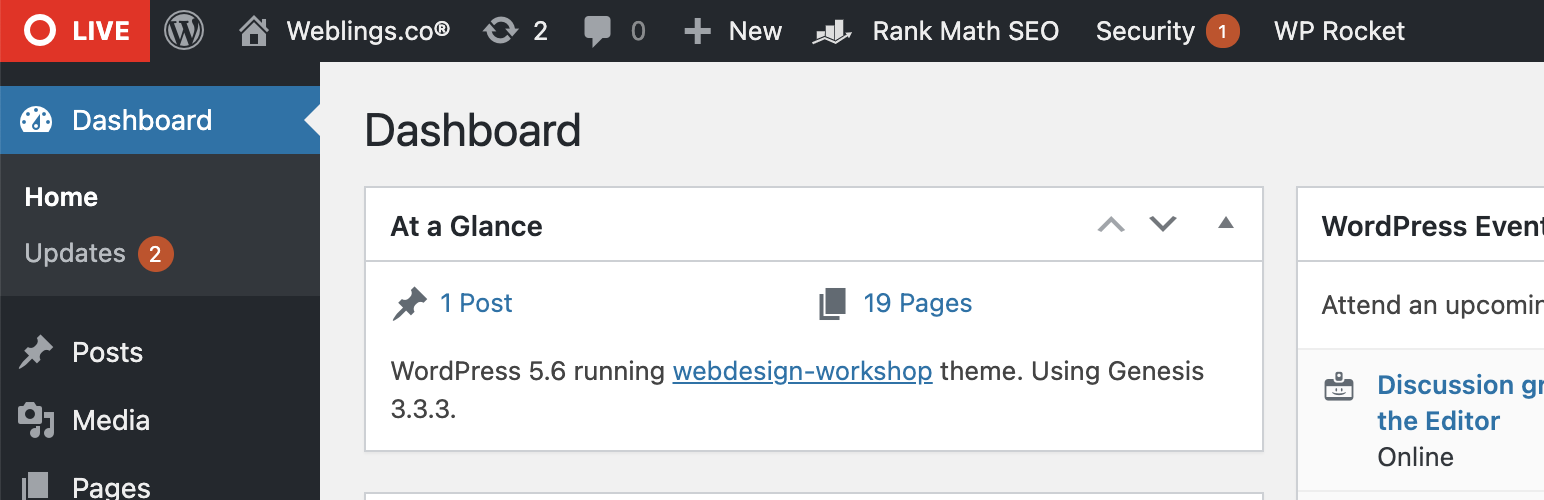
wordpress.org/plugins/devstageSimplest admin bar indicator created by Weblings, to easily recognise whether you are in Development, Staging or Live environment.
Is DevStage Safe to Use in 2026?
Generally Safe
Score 85/100DevStage has no known CVEs and is actively maintained. It's a solid choice for most WordPress installations.
Based on the provided static analysis and vulnerability history, the "devstage" plugin v1.1.0 exhibits a strong security posture. The absence of any identified dangerous functions, file operations, external HTTP requests, and the consistent use of prepared statements for SQL queries are excellent indicators of secure coding practices. Furthermore, the proper escaping of all output and the complete lack of recorded vulnerabilities in its history suggest a commitment to security by the developers or a very stable development process. The attack surface is completely protected, with no identified AJAX handlers, REST API routes, shortcodes, or cron events that are accessible without proper authentication or authorization. There are no reported CVEs, further bolstering confidence in its current security. The plugin demonstrates a well-secured codebase with no immediate exploitable vulnerabilities detected. The only potential area for enhancement, though not a vulnerability, is the complete absence of nonce and capability checks, which while not currently an issue due to the zero attack surface, could be a point of concern if the plugin were to evolve and expose new entry points in the future without adding these security layers.
DevStage Security Vulnerabilities
DevStage Release Timeline
DevStage Code Analysis
Output Escaping
DevStage Attack Surface
WordPress Hooks 5
Maintenance & Trust
DevStage Maintenance & Trust
Maintenance Signals
Community Trust
DevStage Alternatives

365i Environment Indicator
365i-environment-indicator
Displays a color-coded DEV, STAGING, or LIVE indicator in the admin bar to prevent accidental changes on production sites.

Dev Favicon Switcher
dev-favicon-switcher
Automatically switches your favicon (site icon) between production and development environments to prevent confusion.

EnvBeacon
envbeacon
Display a colored notice in the WordPress admin bar to indicate which environment (Live, Staging, Local) your site is running on.

What Template
what-template
Adds the current page's template name to the admin bar.

Apermo AdminBar
apermo-adminbar
This plugin allows you to add links between a development, staging and live version of your website, and adds them to the AdminBar.
DevStage Developer Profile
1 plugin · 10 total installs
How We Detect DevStage
Patterns used to identify this plugin on WordPress sites during automated security audits and web crawling.
Asset Fingerprints
/wp-content/plugins/devstage/assets/css/devstage.css/wp-content/plugins/devstage/assets/js/devstage-admin.jsHTML / DOM Fingerprints
ab-iconab-label<!-- Generated by the WordPress Option Page generator
at http://jeremyhixon.com/wp-tools/option-page/ --><!-- Retrieve this value with:
$devstage_options = get_option( 'devstage_option_name' ); // Array of All Options
$development_environment_domain_0 = $devstage_options['development_environment_domain_0']; // development environment domain
$staging_environment_domain_1 = $devstage_options['staging_environment_domain_1']; // staging environment domain
--><!-- DevStage logic --><!-- Add settings link under plugin on plugin screen -->id="development_environment_domain_0"id="staging_environment_domain_1"name="devstage_option_name[development_environment_domain_0]"name="devstage_option_name[staging_environment_domain_1]"<span class="ab-icon"></span><span class="ab-label">DEV</span><span class="ab-icon"></span><span class="ab-label">STAGE</span><span class="ab-icon"></span><span class="ab-label">LIVE</span>